Srikantharun's Engineering Blog
Technical deep-dives on build systems, toolchains, and cross-platform development
Bazel IDE Toolkit: Complete Bazel IDE Experience for VS Code
by
One of the biggest pain points for developers working with Bazel-based C++ projects is getting proper IDE support. Unlike CMake which generates compile_commands.json natively, Bazel requires additional tooling to enable features like code completion, go-to-definition, and real-time error checking.
I’ve published Bazel IDE Toolkit (now v0.3.0) - a VS Code extension that brings a complete Bazel development experience with auto-refresh, build/test/run commands, CodeLens, and more.
The Problem
When you open a C++ file in a Bazel project without compile_commands.json:
- No autocomplete suggestions
#includepaths show red squiggles- Go-to-definition doesn’t work
- No real-time error checking
This happens because clangd (the language server) has no idea how Bazel organizes your build - the include paths, compiler flags, and dependencies are all managed by Bazel’s sandboxed build system.
The Solution
The Bazel IDE Toolkit extension provides a complete Bazel development experience:
Core Features (v0.1.0)
- Auto-refresh
compile_commands.jsonwhen BUILD files change - File watching for BUILD, .bzl, WORKSPACE, and MODULE.bazel
- Status bar integration showing refresh status
Build/Run/Test Integration (v0.2.0)
- Build/Run/Test commands from the command palette
- Keyboard shortcuts -
Cmd+Shift+Bto build,Cmd+Shift+Tto test - Target discovery via
bazel query
CodeLens & Starlark Support (v0.3.0)
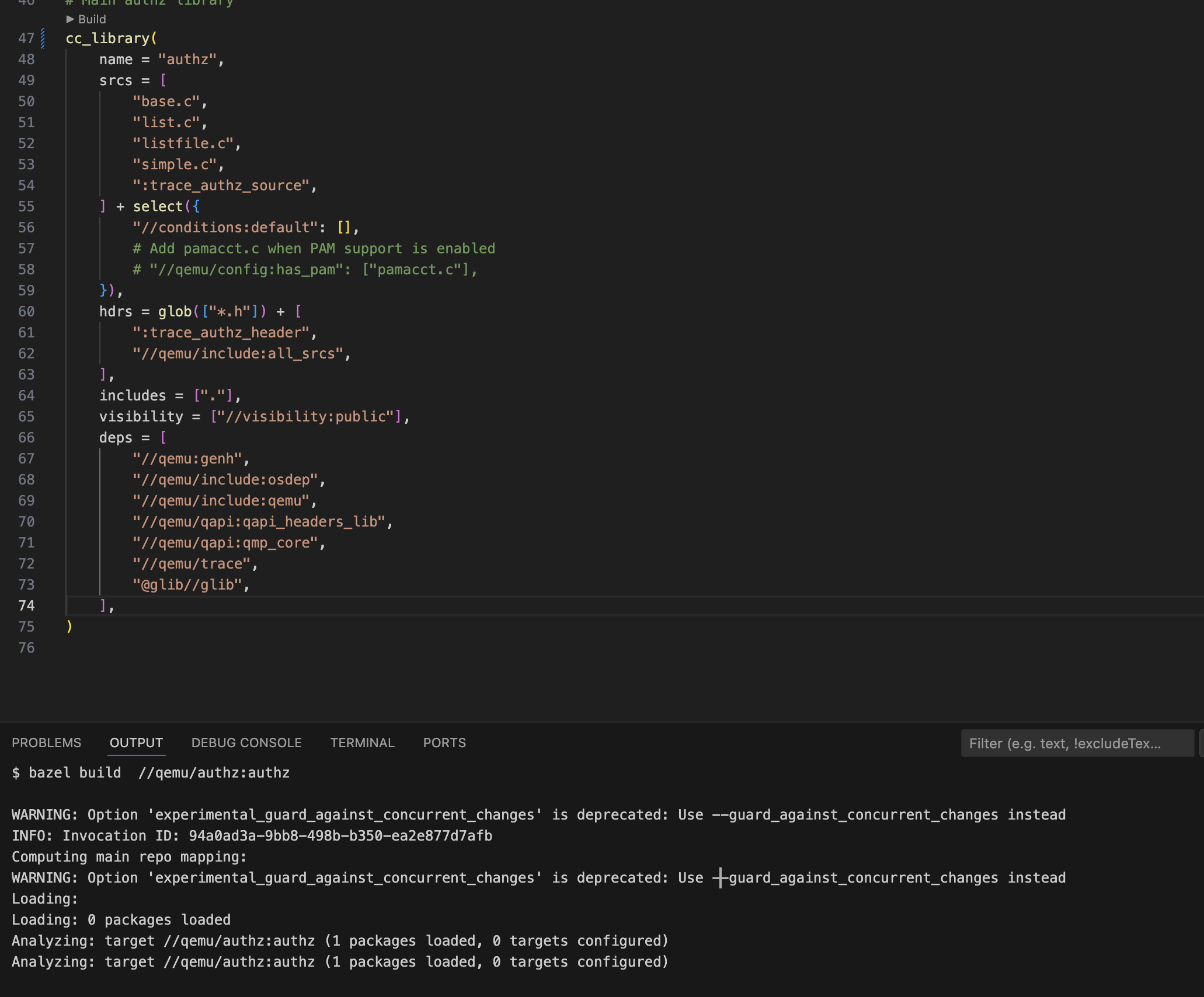
- CodeLens - Clickable “Build”, “Test”, “Run” buttons above targets in BUILD files
- Starlark syntax highlighting for BUILD, .bzl, WORKSPACE, MODULE.bazel
- Buildifier integration - Auto-format on save
- Dependency visualization - See what depends on what
Setup Guide
Step 1: Add hedron_compile_commands to MODULE.bazel
Add the following to your MODULE.bazel:
bazel_dep(name = "hedron_compile_commands", dev_dependency = True)
git_override(
    module_name = "hedron_compile_commands",
    remote = "https://github.com/hedronvision/bazel-compile-commands-extractor.git",
    commit = "4f28899228fb3ad0126897876f147ca15026151e",
)
Step 2: Add refresh target to BUILD.bazel
Add to your root BUILD.bazel:
load("@hedron_compile_commands//:refresh_compile_commands.bzl", "refresh_compile_commands")

refresh_compile_commands(
    name = "refresh_compile_commands",
    targets = {
        "//...": "",
    },
)
For large monorepos, you may want to specify specific targets instead of //...:
refresh_compile_commands(
    name = "refresh_compile_commands",
    exclude_external_sources = True,
    targets = {
        "//src/...": "",
        "//lib/...": "",
        "//tools/...": "",
    },
)
Step 3: Install VS Code Extensions
Install two extensions:
- clangd - The language server that provides IntelliSense
- Bazel IDE Toolkit - Auto-refresh compile_commands.json
code --install-extension llvm-vs-code-extensions.vscode-clangd
code --install-extension srikantharun.bazel-ide-toolkit
Step 4: Initial Generation
Generate compile_commands.json for the first time:
bazel run //:refresh_compile_commands
This may take a few minutes for large projects as it needs to analyze the build graph.
Using the Extension
Once installed, the extension activates automatically when you open a Bazel workspace (detected by presence of WORKSPACE, WORKSPACE.bazel, or MODULE.bazel).
Status Bar
Look for “Bazel” in the bottom status bar:
$(sync) Bazel- Idle, click to manually refresh$(sync~spin) Bazel- Refresh in progress$(check) Bazel- Last refresh successful$(error) Bazel- Last refresh failed
Commands
Press Cmd+Shift+P (or Ctrl+Shift+P on Linux/Windows) and type “Bazel:” to see available commands:
| Command | Description |
|---|---|
Bazel: Refresh compile_commands.json |
Manually trigger refresh |
Bazel: Toggle Auto-Refresh |
Enable/disable automatic refresh |
Bazel: Select Platform |
Choose target platform for cross-compilation |
Bazel: Build Target |
Build a Bazel target |
Bazel: Test Target |
Run tests for a target |
Bazel: Run Target |
Run a binary target |
Bazel: Build Current File's Target |
Build the target containing current file |
Bazel: Test Current File |
Test the current file’s target |
Bazel: Format BUILD File (Buildifier) |
Format current BUILD file |
Bazel: Show Dependencies |
Show what a target depends on |
Bazel: Show Reverse Dependencies |
Show what depends on a target |
Keyboard Shortcuts
| Shortcut | Command |
|---|---|
Cmd+Shift+B / Ctrl+Shift+B |
Build current file’s target |
Cmd+Shift+T / Ctrl+Shift+T |
Test current file |
Alt+Shift+F |
Format BUILD file with Buildifier |
Settings
Configure the extension in VS Code settings:
{
  "bazelIdeToolkit.autoRefresh": true,
  "bazelIdeToolkit.debounceMs": 2000,
  "bazelIdeToolkit.targets": "//...",
  "bazelIdeToolkit.showStatusBar": true,
  "bazelIdeToolkit.enableCodeLens": true,
  "bazelIdeToolkit.buildifierOnSave": true,
  "bazelIdeToolkit.buildifierPath": "buildifier",
  "bazelIdeToolkit.buildFlags": [],
  "bazelIdeToolkit.testFlags": [],
  "bazelIdeToolkit.runFlags": []
}
CodeLens
When you open a BUILD file, you’ll see clickable buttons above each target. Click “Build” to build, “Test” to run tests, or “Run” for binary targets.
Buildifier Integration
Install Buildifier for automatic formatting:
# macOS
brew install buildifier

# Linux
go install github.com/bazelbuild/buildtools/buildifier@latest
BUILD files will auto-format on save, or use Alt+Shift+F to format manually.
Dependency Visualization
Understand your build graph with dependency commands:
Show Dependencies (Bazel: Show Dependencies)
Dependencies of //src:my_lib:

  → //src:utils
  → //lib:logging
  → @abseil-cpp//absl/strings

Total: 3 direct dependencies
Show Reverse Dependencies (Bazel: Show Reverse Dependencies)
What depends on //src:utils:

  ← //src:my_lib
  ← //src:my_binary
  ← //tests:utils_test

Total: 3 reverse dependencies
How It Works
BUILD file changed
       ↓
Extension detects change (file watcher)
       ↓
Wait for debounce period (default 2s)
       ↓
Run: bazel run @hedron_compile_commands//:refresh_all
       ↓
compile_commands.json updated
       ↓
clangd reloads automatically
       ↓
IntelliSense updated!
Tips for Large Monorepos
Use Specific Targets
Instead of //..., specify the packages you’re actively working on:
refresh_compile_commands(
    name = "refresh_compile_commands",
    targets = {
        "//myproject/src/...": "",
        "//myproject/lib/...": "",
    },
)
Exclude External Sources
If you don’t need IntelliSense for external dependencies:
refresh_compile_commands(
    name = "refresh_compile_commands",
    exclude_external_sources = True,
    targets = {"//...": ""},
)
Disable Remote Cache for Local Development
If your project uses a remote cache you don’t have access to:
bazel run //:refresh_compile_commands --remote_cache=
Increase Debounce Time
For projects where BUILD files change frequently:
{
  "bazelIdeToolkit.debounceMs": 5000
}
Troubleshooting
“No compile_commands generator found”
Make sure you’ve added both:
hedron_compile_commandsto MODULE.bazelrefresh_compile_commandstarget to BUILD.bazel
Refresh fails with package errors
Some packages in your workspace may have errors. Specify working packages explicitly in the targets attribute instead of using //....
clangd not picking up changes
Try reloading the VS Code window (Cmd+Shift+P → “Reload Window”) or restart clangd (Cmd+Shift+P → “clangd: Restart language server”).
Links
- VS Code Extension: marketplace.visualstudio.com/items?itemName=srikantharun.bazel-ide-toolkit
- GitHub Repository: github.com/srikantharun/bazel-ide-toolkit
- hedron_compile_commands: github.com/hedronvision/bazel-compile-commands-extractor
Contributing
Found a bug or have a feature request? Open an issue on GitHub.
This extension was created to solve a real pain point I experienced working on large Bazel C++ monorepos. I hope it helps improve your development experience too!